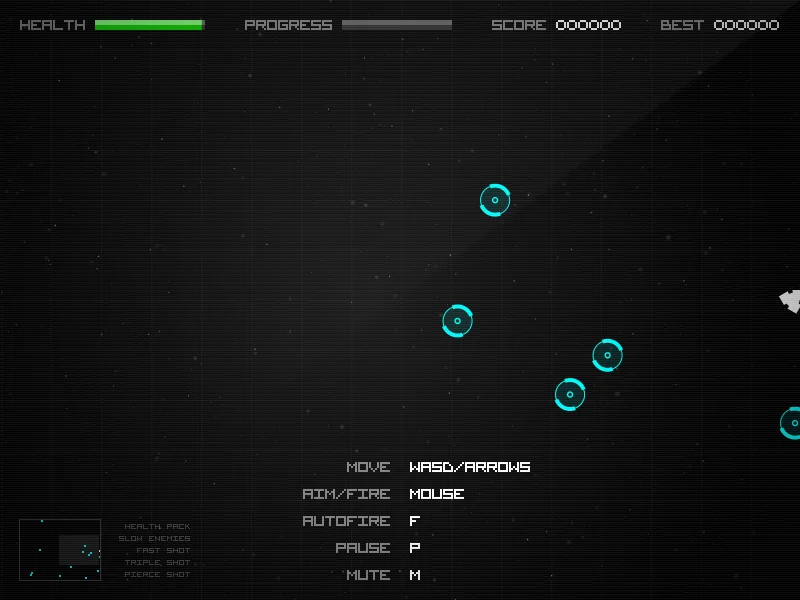
The credited original
Radius Raid is Jack Rugile's small space-arena shooter, originally entered in js13kGames 2013. The competition build on our shelf has an existing desktop opening check; this article does not announce a new release or a full completion review.
Its appeal to investigate is the relationship between space and pressure: keeping a route open while threats approach, rather than standing still and judging only how quickly targets disappear.
Separate movement and aiming
Our recorded competition-build controls use WASD or arrows to move, mouse aiming and firing, F for autofire, P for pause and M for mute. Other revisions may differ, so follow the instructions of the build you actually open.
A mouse and keyboard are the documented path. We have not verified a phone control scheme. Flashing particles and brisk motion also make this a different kind of break from a quiet logic puzzle.
Read pressure, then retry
In a first attempt, watch where an escape route closes. On the next, change one movement decision: turn earlier or stop following a target toward the edge. Compare the situation you reached, without inventing a score improvement.
The useful question is whether you can recognize danger early enough to act. If the answer depends on an off-screen threat, record that circumstance and whether the minimap helped rather than concluding the game is unfair from one loss.
Give a useful observation
A precise note names the input, visible threat and moment when you lost room to move. A screenshot and build link are more actionable than “too hard,” especially when different hosted revisions exist.
Open the credited entry for the original play link. The AI bug-report article shows how to turn a reproducible observation into a narrow implementation request for your own project.
Official references
References checked: . The cover is a credited game screenshot, not output from this tutorial.
Keep going
Browser game guides
Practical reading for players and independent makers.
Hashi — Puzzle Fern: how to choose your first bridge
Hashi — Puzzle Fern is soler-yang's browser implementation of the island-and-bridge puzzle. Its public creator page describes clicking an island and an outlined neighbor to cycle through one bridge, two bridges and no bridge.
itch.io AI game pages: quality rules creators should actually check
The recent discussion about AI uploads makes itch.io's own quality guidelines useful reading. They address mass-generated pages, misleading presentation and accurate generative-AI tagging; a large upload count is not a publication strategy.
AI game prompts
Turn a small game idea into editable design, build, test and iteration prompts. Local templates; copy or download without an account.