An older racer worth rediscovering
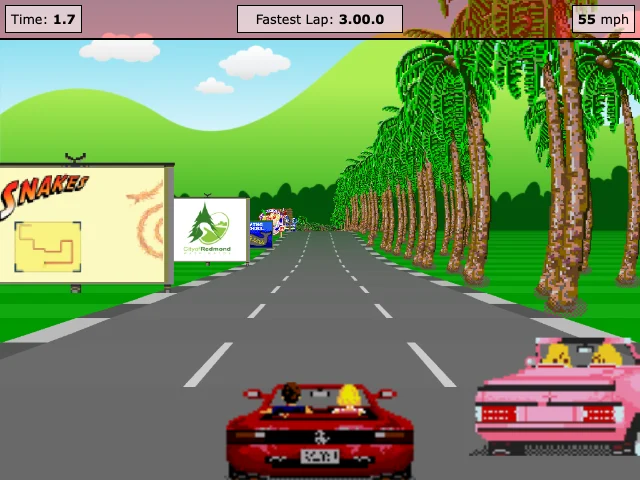
JavaScript Racer is Jake Gordon's retro road experiment, supported by a 2012 tutorial series. It is a useful rediscovery for people who enjoy a visible road, immediate steering and the illusion of depth, rather than a newly released racing simulation.
The question to bring to a first drive is not how large the world is. It is whether you can read the approaching road and understand how a small input changes your position. That compact feedback loop can carry a surprisingly engaging experiment.
Start with the road
Open the credited game entry and follow the author's playable link. Read the on-page controls and version choice before driving. Our existing opening check recorded acceleration and the displayed speed; it was not a complete handling review.
Use a desktop keyboard for the documented path. We do not claim phone controls, every course or every browser have been checked. If you try another setup, mention the selected version and device when describing what works or fails.
What creates the sense of speed?
In a pseudo-3D road, distant segments narrow while nearby ones expand toward the camera. Repeating roadside objects and the road's movement make speed legible without requiring a fully modeled open world. The author's tutorial explains the projection approach.
As a player, notice whether you react to the next bend early or make corrections only at the screen edge. As a creator, that observation suggests a test: can someone anticipate a turn from the visual cues before losing control?
What the tutorial actually teaches
The tutorial starts with straight road geometry, projection, a game loop, sprites and keyboard support, then develops the experiment across several articles. These are explicit implementation steps, not proof that a single request creates a complete commercial racer.
The original is not an AI-generated case study. Credit Jake Gordon and the project's contributors, and review code and asset permissions separately before reuse. Studying the relationship between controls and feedback does not require copying the track or artwork.
A smaller AI game brief
Our night-delivery starter proposes a single original street where braking protects parcels but spends time. That creates a concrete tradeoff for an AI-assisted prototype: a player can succeed, fail and choose a different approach on the next attempt.
Use the prompt studio to define one scene, then ask for movement, delivery, a visible timer and restart before decoration. Pair the build with the manual-test prompt. For another example of a small readable action, continue to Tiny Platformer.
Official references
References checked: . The cover is a credited game screenshot, not output from this tutorial.
Keep going
Browser game guides
Practical reading for players and independent makers.
One screen, one jump
A closer look at Jake Gordon’s minimal platform game, its controls and the decisions hidden in a single screen.
Your first AI game brief
Three original starting briefs and a four-stage prompt pack you can edit, copy and test with your chosen AI.
AI game prompts
Turn a small game idea into editable design, build, test and iteration prompts. Local templates; copy or download without an account.